
Context files between the agent and generic UI
The set of markdown files I keep so I can trust an agent to draft my designs

Hi designers,
Happy Tuesday! Today I want to talk about the thing that took me embarrassingly long to understand about working with agents — because the moment it clicked, it changed how I set up almost every project.
Here’s the shape of it: an agent will hand you something that’s genuinely good and quietly generic at the same time. Clean, competent, clearly made by something that knows what it’s doing — and then missing the empty state, leaning on colour alone to carry meaning, reaching for a pattern you’d already decided against. The part that took me longest to accept is that none of it is the agent being careless. It’s doing a completely sensible job of the brief it actually had. The trouble is the brief was so much thinner than the one in my head — and I hadn’t clocked how much of the real brief was just… living in me, unwritten.
That’s what I want to poke at this week. When a designer isn’t in the room, the design intent is the first thing to go. Not the skills — the agent can write React all day.But the agent doesn’t know which of your colours carries meaning and which is just decoration, that your users misread status when it’s shown by colour alone, or that you looked hard at a modal for this exact spot last month and talked yourself out of it, for reasons you’d still stand by. So it fills those gaps the only way it can — it guesses. Usually well enough to look right, which is exactly what makes the wrong bits so easy to miss.
I’ve talked before about context design — handing a tool a world before you hand it a task. This issue is the very unglamorous, this-is-what’s-actually-in-my-repo version of that. The specific files. What goes in each. The order the agent reaches for them. Less grand than “context design” sounds, and I’ve found it far more useful.
The files aren’t docs. They’re guardrails.
This is the reframe that made everything else click, so let me sit on it for a moment. It’s natural to picture these files as documentation — the sort of thing you’d write for someone joining the team next quarter. I did, at first, and it’s exactly why my early ones were useless. A human reader wants the story and the reasoning; they want to understand why a rule exists before they’ll trust it. An agent doesn’t want any of that. It wants a rule it can hold its own output against, right now, before it generates a single thing.
Which changes what’s even worth writing down. “We value clarity” — lovely, and no help at all, because there’s nothing in it to check against. “Status is never shown by colour alone” — that one it can actually run against its own work. So the files that earn their place read less like a style guide and more like a set of guardrails. They narrow what comes out before it comes out, rather than explaining it after the fact.
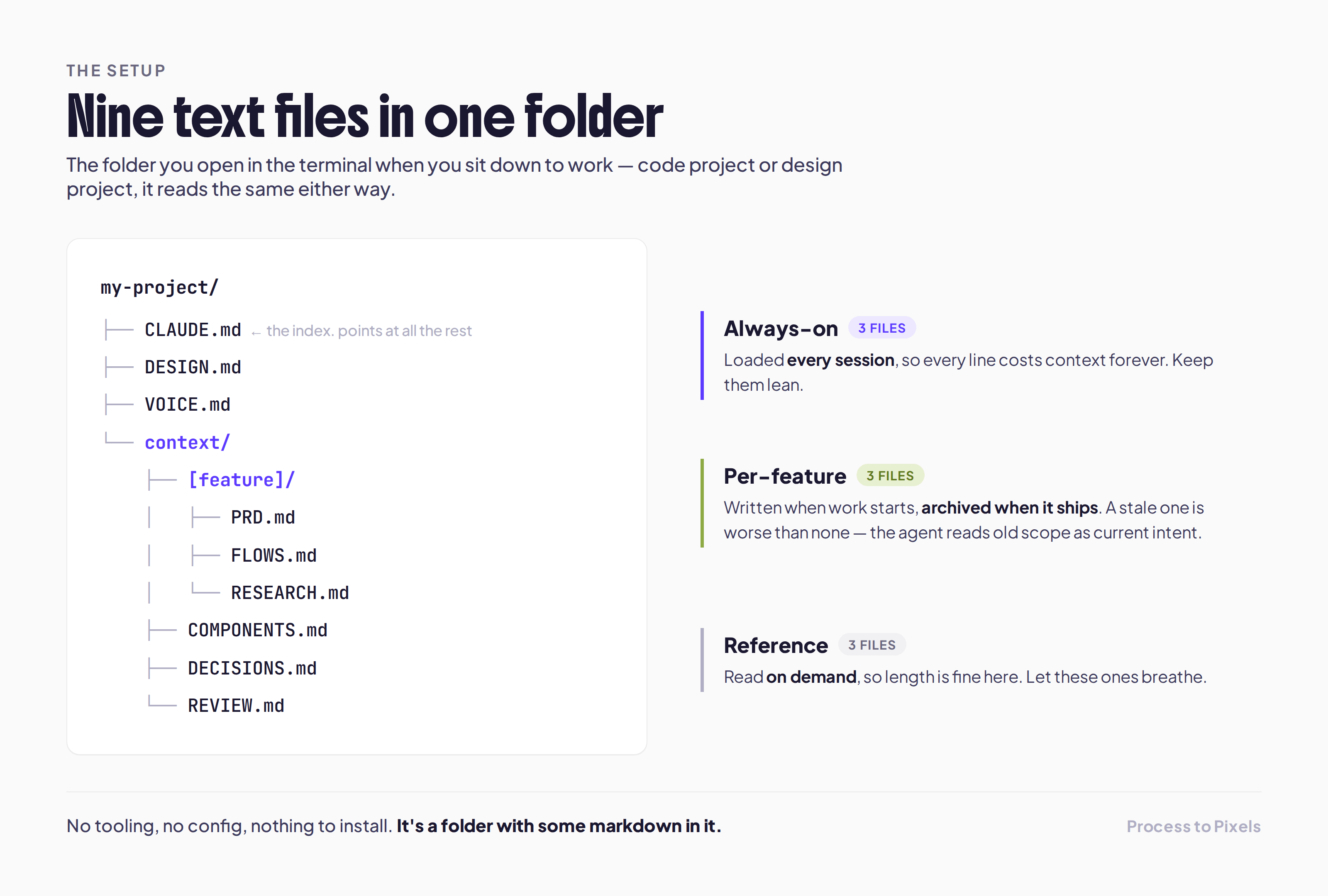
Here’s the set I’ve landed on, roughly in the order the agent reaches for them. This is the Claude Code version, where the files live in the repo — but the same instinct is underneath the Figma-over-MCP and Notion loops I’ve written about before.
Nine files can seem a lot - but honestly, I treat it as an investment into smoother work. I use Claude with every client to draft the ideas and get layout and content options. As I’m working with the same clients for months, taking time to set up a structure for each promises a better turnaround.
The always-on three
These load every single session, so they’re the expensive ones — every line costs context budget forever, and a bloated file waters down the constraints that actually matter. I try hard to keep them lean.
CLAUDE.md lives at the root. On paper it’s the boring one — stack, commands, conventions. But its most important job is the least obvious one: it points at the other files. It’s the thing that tells the agent the others exist and when to open them. Skip that, and the other eight might as well not be there, because nothing ever sends the agent to go read them.
The stack, and the commands to build / test / run
Folder layout and naming conventions
What not to touch — generated files, vendor code
An index of the other files: what each is for, and when to open it
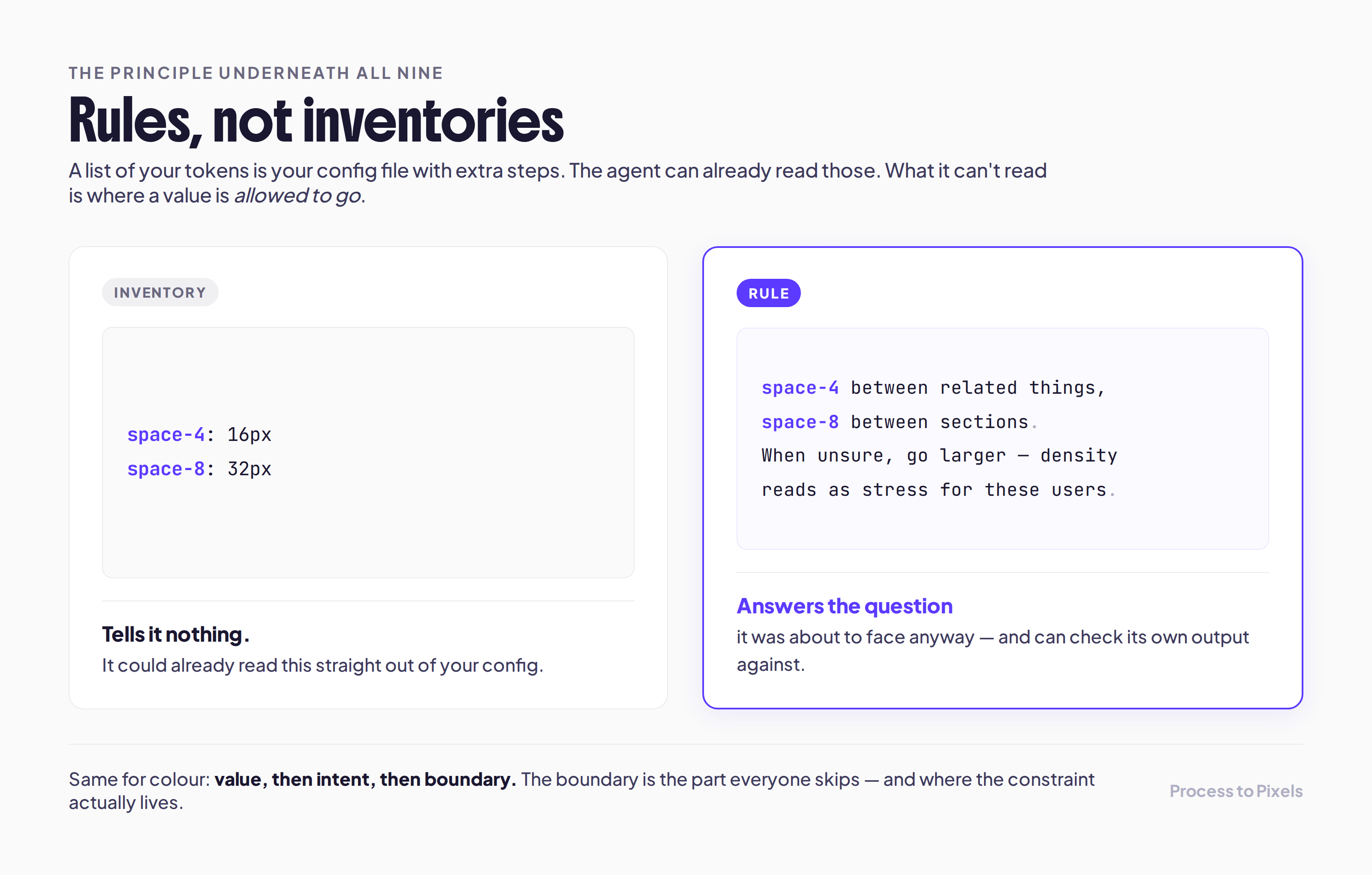
DESIGN.md is the one I come back to in these letters more than any other, because for a designer it’s the highest-leverage thing in the whole set. The trap is writing it as an inventory. The agent already has my hex values — it can read those straight out of the config without me. What it can’t read is where a value is allowed to go, and where it isn’t. So this file is mostly boundaries and reasons, written as plain sentences.
Tokens with intent — the value, plus where it may and may not be used
The type scale, and the logic for which step goes where
Spacing rules — the space-4 / space-8 reasoning, not just the numbers
Component rules as prose; colour written as value → intent → boundary
VOICE.md is the cheapest win here and the one people skip most, which is a shame, because it heads off a whole category of tiny trust-leaks. It’s small. But it’s the difference between an empty state that sounds like you and one that greets your user with “Oops! Something went wrong.”
A terminology table — what we call things, and what we don’t
Button and label phrasing
Error, empty-state and confirmation wording
Tone notes: the words we never use
The per-feature three
These are a different animal — written when a piece of work kicks off, archived the moment it ships. That archiving matters more than it looks. A stale per-feature file is worse than no file at all, because the agent has no way to tell it’s stale; it reads last month’s scope as this week’s plan and builds confidently off in the wrong direction.
PRD.md is problem, scope, acceptance criteria — but the section that actually earns its place is out of scope. Agents expand scope constantly, and helpfully; it’s one of the more endearing and more expensive things they do. An explicit “not this, not now” list is the only brake I’ve found that reliably holds.
The problem, in one honest sentence
Scope and acceptance criteria
Out of scope — the explicit “not this, not now” list
What “done” and “working” actually mean here
FLOWS.md is every state the feature can be in — default, loading, empty, saving, error, blocked — and what each one looks like. Agents build the happy path, because very often it’s the only path anyone described to them. This is where the other eighty percent lives. The empty state nobody remembers to design? It doesn’t go missing if this file exists.
Every state: default, loading, empty, saving, error, blocked
What each state looks like, and what moves you into it
The edge cases you already know are coming — overflow, failure, no data yet
RESEARCH.md is synthesis, never raw notes. I write each finding as finding → evidence → implication, because the implication is the only part that’s actually designable. And the small move that makes the whole file pull its weight: link each finding to the rule it ended up producing. That thread is what stops an agent from cheerfully “simplifying away” a constraint that looks arbitrary from the outside but was hard-won on the inside.
Findings, synthesised — never a dump of raw notes
Each one as finding → evidence → implication
A link from each finding to the rule it produced
The reference three
The last three get read on demand rather than every session, so length stops being a worry — you can let these ones breathe.
COMPONENTS.md is the canonical answer to “does this already exist?” Left alone, an agent will happily build a brand-new component instead of finding the one you already have, and that’s the single most common source of design-system drift I run into in an agentic workflow. What makes it work isn’t tidiness — it’s honesty. A file that owns up to where Figma and code have drifted apart is one the agent can lean on. A neat file that’s wrong just teaches it to be confidently wrong too.
What already exists — the canonical list
A don’t-build / out-of-scope list
Known Figma-vs-code drift, stated plainly
DECISIONS.md is append-only, and I’m a little religious about that. The moment you edit the history, you delete the evidence that you already weighed an alternative and set it aside — and then that same suggestion comes wandering back a month later in a slightly different outfit. Write down what you rejected, and a sentence on why. It’s the nearest thing I’ve got to memory that survives across sessions.
What was chosen — and what was rejected
A line on why, for each
Append-only, and dated
REVIEW.md is the checklist the agent runs before it’s allowed to tell me it’s done — every item phrased as a yes/no question. This is the file that grows. Same class of bug turns up twice, I add a line. Over time it becomes a running record of everything the agent and I have learned the hard way.
The pre-”done” checklist, every item a yes/no
Accessibility, all states present, tokens used, copy checked
It grows: same bug twice → a new line
What’s actually holding all nine together
If I had to squeeze the whole set into one idea, it’s this: write rules, not inventories. A list of your tokens is your config file with extra steps — space-4: 16px tells an agent nothing it couldn’t already see. But “space-4 between related things, space-8 between sections, and when you’re unsure go larger, because density reads as stress for these users” — that answers a question it’s about to face anyway. Colour’s the same: value, then intent, then boundary. The boundary is the part almost everyone leaves off, and it’s the part where the constraint actually lives.
Please don’t sit down and write all nine
I mean this — I’ve watched people do it and regret the afternoon. Don’t produce nine hypothetical documents in one sitting. You’ll learn almost nothing from it, and none of them will survive contact with real work anyway.
Start with two: CLAUDE.md and DESIGN.md. Then let the rest arrive when their absence starts actually costing you something. FLOWS.md shows up the first time an agent hands you a screen with no empty state. VOICE.md after the third “Oops.” DECISIONS.md the first time an agent happily undoes something you’d decided on purpose. The pain is a better guide to what to write next than any template.
And write them at maybe sixty percent — then let the agent finish the job of showing you what’s missing. This is the part I’ve come to actually enjoy: ask it for three variations of your most complex screen, and then ignore whether they look good. Watch where they drift. Everywhere all three wander off in the same direction is a constraint your file hasn’t said out loud yet. Add it, run it again. Most files settle after two or three rounds of this. The mistakes turn out to be the diagnostic — they show you, pretty precisely, the sentence you forgot to write. Which beats finding out from a user.
The bit I want you to hold onto
If the work an agent hands back feels generic, or a bit off in a way you can’t quite name, the fix is almost never a cleverer prompt, and it’s really never a newer tool. It’s one step upstream: tell it what world it’s standing in, and give it the few rules it could never infer from your hex values. Most of what we call unreliability is a missing constraint wearing a disguise.
And here’s the part I actually like, the gentle one — none of this is a new skill you have to go and learn. You already make all of it. The states, the decisions, the things you ruled out and why — you’ve just been holding them in your head, or writing them for the team. Writing them for the agent is the same work, aimed at one more reader. For me it did something I didn’t expect: it made the work feel more like designing again, not less, because the deciding moved back onto a page where I could see it and change my mind — instead of happening by accident inside a re-roll I’d never be able to reconstruct.
I’m curious which of the nine you’d reach for first — reply and tell me, I read every single one. 🧡
That’s the whole what and why, and it’s the part I most wanted you to have — it stands on its own, and you could stop right here, go write your first two files this afternoon, and be better off for it. But there’s a real gap between knowing the nine files exist and actually having them set up, sensibly worded, and wired into Claude so they get read every session without you having to think about it. So I did that part too — the templates, plus the playbook for running them — and it’s just below.
The playbook: the nine templates, and how to actually run them
I put all nine together as a starter kit — not fill-in-the-blank skeletons, but complete worked examples you can gut and refill with your own product. Each one is written the way I actually keep mine, so you’re editing a real file instead of staring down an empty one.
